100% local · no data sent anywhere

Your wealth, fully private

Track your crypto, stocks, ETFs, real estate and cash in one place. Coffr runs entirely on your device — no server, no account, no data collection.

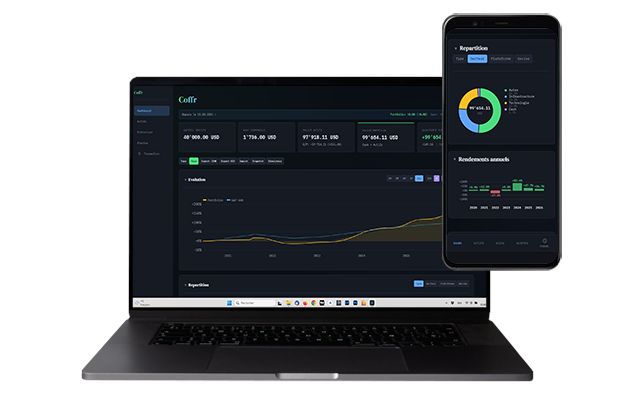
Coffr — Portfolio tracking dashboard on desktop and smartphone

Everything you need to track your wealth

A full-featured portfolio tracker with no compromises on privacy.

Full overview at a glance

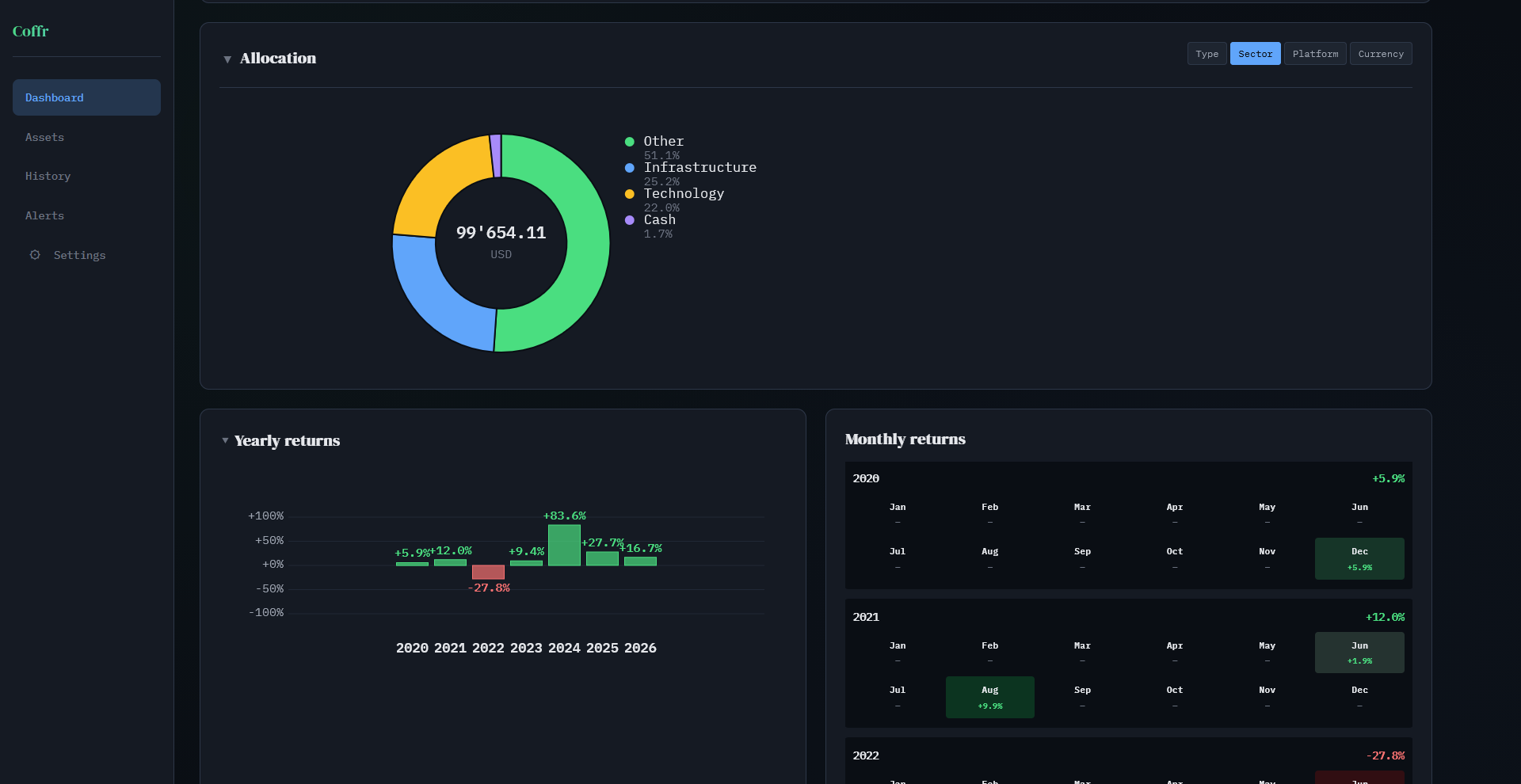
Your total net worth, its breakdown and recent performance — all on one screen, in the currency of your choice.

  • Total value with real-time variation
  • Breakdown by platform and asset type
  • 8 currencies supported (CHF, EUR, USD...)
  • Historical portfolio snapshots
Coffr — Dashboard overview with allocation breakdown and charts

All your assets, all your platforms

Consolidate investments spread across Binance, Interactive Brokers, Etoro, Coinbase, etc.

  • Crypto, stocks, ETFs, bonds, real estate, cash
  • Long and short positions
  • Buy, sell, transfer between platforms
  • Live prices via CoinGecko & Yahoo Finance
Platforms
Binance · 4 assets+12.4%
Etoro · 6 assets+3.8%
Coinbase · 1 asset+1.2%
Real Estate · 1 asset
Asset types

Interactive visual analytics

High-performance Canvas charts with interactive crosshair — pie, donut, stacked bars and evolution curves.

  • Evolution curve with hover tooltip
  • Pie / donut breakdown
  • Currency / percentage mode
  • Period filters (7d, 30d, 90d, 1y, max)
JanFevMarAvrMaiJun JulAouSepOctNovDec

Smart alerts

Set price thresholds and get notified when your assets reach your targets.

  • High / low price alerts per asset
  • Percentage change alerts
  • Push notifications (PWA)
  • Triggered alerts history
BTC > $100,000
Target reached!
ETH < $2,500
Buy signal
Portfolio −5%
Daily change

Real-time market analysis

Track sector rotations and crypto sentiment directly from the app, with up-to-date data.

  • S&P 500 sector performance (11 sectors)
  • Sector evolution with interactive charts
  • Crypto Sentiment: Bull / Bear signal
Crypto Sentiment
BULL
Sentiment✓ Positive
Trend✓ Bullish
Momentum✓ Strong
S&P 500 Sectors

Tools for investors

Watchlist, compound interest simulator, benchmark and passive income tracking — everything you need to optimize your strategy.

  • Watchlist: track assets without owning them
  • Interactive compound interest simulator
  • S&P 500 & BTC benchmark on your charts
  • Passive income: aggregated dividends & staking
Watchlist
NVDA · Nvidia+2.4%
SOL · Solana-1.8%
CSPX.L · S&P 500+0.6%
Simulator
Initial capitalUSD 10,000
Return8% / year
After 20 yearsUSD 46,610

Ready in 3 steps

No sign-up required. Start tracking your wealth in under a minute.

1

Add your platforms

Create your accounts: Binance, Etoro, bank, retirement fund, real estate... Name them freely.

2

Enter your assets

Add your crypto, stocks, ETFs, bonds or cash. Prices update automatically.

3

Track the evolution

Check your dashboard, analyze charts, set up alerts and export your data.

Tips for automatic price updates

Stocks & ETFs

Prices are provided by Yahoo Finance. Use the Yahoo ticker as the asset name, with the stock exchange suffix:

.PA Paris .SW Switzerland .L London .DE Frankfurt .AS Amsterdam .MI Milan

Examples: AAPL (US, no suffix), MC.PA (LVMH Paris), CSPX.L (S&P 500 ETF London)

Cryptocurrencies

Prices are provided by CoinGecko. Major cryptocurrencies are automatically recognized by their ticker (BTC, ETH, SOL...).

For lesser-known tokens, enter the CoinGecko API ID in the dedicated field when adding the asset. You can find it on the token's CoinGecko page, in the Info column (e.g. render-token).


Install Coffr like a native app

Coffr is a Progressive Web App: install it on your device for offline access and push notifications.

1

Open Coffr in Chrome or Edge

Navigate to the app page in your desktop browser.

2

Click the install icon

In the address bar, click the icon or the "Install Coffr" banner that appears at the bottom.

3

Confirm the installation

Click "Install" in the popup. Coffr opens as a native app with its icon in your taskbar.

1

Open Coffr in Chrome

Navigate to the app from your Android browser.

2

Tap "Add to Home screen"

Open the menu at the top right, then select "Add to Home screen" or "Install app".

3

Launch from Home screen

The Coffr icon appears on your home screen. The app runs fullscreen, just like a native app.

1

Open Coffr in Safari

On iOS, only Safari supports PWA installation. Open the app in Safari.

2

Tap the Share button

Tap the share icon (square with upward arrow) at the bottom of the screen.

3

Select "Add to Home Screen"

Scroll through the options and tap "Add to Home Screen". Confirm by tapping "Add".


Built for privacy

No server, no account, no tracking. Your data stays on your device.

100% offline

All data is stored locally (IndexedDB). No server, no authentication API. You are the only one who can access your data.

AES-256 encryption

Protect your data with a PIN code. AES-GCM 256-bit encryption, PBKDF2 key derivation with 310,000 iterations.

Multi-currency

CHF, EUR, USD, GBP, JPY, CAD, AUD, CNY. Exchange rates updated automatically via open API.

Full export

Export your data as JSON (full backup) or CSV.

8 languages

French, English, German, Spanish, Italian, Dutch, Portuguese and Japanese.

Native PWA

Install Coffr on mobile and desktop. Works offline, push notifications, automatic updates.


Free, forever

The free plan covers most use cases. Premium unlocks advanced features.

Free
$ 0
To start tracking your wealth
  • Up to 3 platforms
  • 20 assets maximum
  • 3 price alerts
  • CHF, EUR, USD
  • Dashboard, charts, history
  • Export CSV
  • Lock screen
Start for free

Ready to take control of your wealth?

No sign-up. No data shared. Launch the app and get started in 30 seconds.

Launch Coffr